An open-source Python pipeline for turning a topic or script into narrated short videos with footage, subtitles, music, rendering, and optional social publishing
利用 AI 大模型和自动化工作流,根据主题或关键词一键生成高清短视频。Generate HD short videos from a topic or keyword with an automated AI workflow.
My analysis
MoneyPrinterTurbo: Inside an AI Short-Video Automation Pipeline
A source-level analysis of MoneyPrinterTurbo, from scripts, voice-over, footage, subtitles, and FFmpeg to queues, Redis, security, cost, and production limits.
TN
TIAN NEWS AI
Published · 25 min read
A short video appears to contain only three things: a few visual scenes, a voice-over, and captions. Automating it reveals a much longer chain of work. A system must write the script, divide it into ideas, find or generate media, synthesize speech, construct a timeline, align subtitles, normalize aspect ratios, mix music, encode the result, retain artifacts, and sometimes publish the finished video to social platforms.
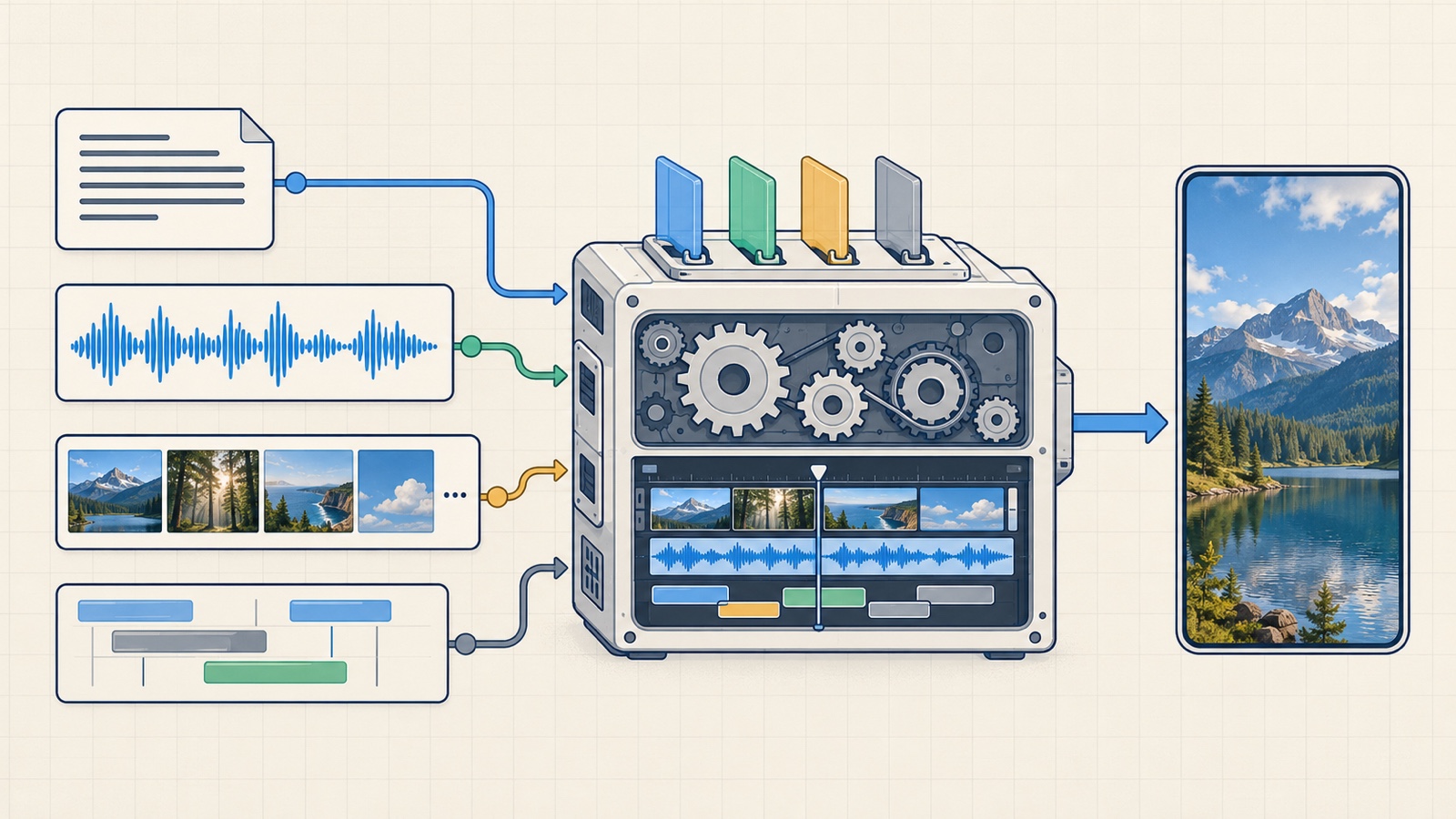
MoneyPrinterTurbo packages that chain into a Python application with a WebUI, REST API, CLI, and an AI-agent skill. Its value does not come from a proprietary video model. It comes from the orchestration layer that connects otherwise separate models and services into an end-to-end workflow.
This analysis examines source commit 18de230c, application version 1.3.8, released on October 3, 2026. At the time of review, the repository had approximately 129,000 stars and 20,000 forks and used the MIT license. Those community numbers are only a point-in-time snapshot, not a substitute for technical evaluation.
Updated
README, source tree, example configuration, Docker Compose, task pipeline, queue, Redis state, API security, and release v1.3.8 were reviewed on October 8, 2026. Pin a release or commit before integrating it.
An open-source Python pipeline for turning a topic or script into narrated short videos with footage, subtitles, music, rendering, and optional social publishing
利用 AI 大模型和自动化工作流,根据主题或关键词一键生成高清短视频。Generate HD short videos from a topic or keyword with an automated AI workflow.
Python
ai-video-generator
content-creation
144.4k144,426 stars23.2k23,186 forksSnapshot Nov 18, 2026
This is a source-level review, not an independent performance benchmark. I have not run a sufficiently large video matrix to make firm claims about render time, output quality, or average cost per finished minute. The production observations below are architectural conclusions drawn from the code and its failure modes.
What it does
MoneyPrinterTurbo is a replaceable short-video assembly line
The shortest accurate description is: a short-video production pipeline whose providers can be swapped stage by stage.
The input may be only a subject, a finished script, existing audio, or a set of local media files. The usual output is a vertical 9:16, landscape 16:9, or square 1:1 MP4 containing voice-over, subtitles, and background music. Between input and output, each stage can use a cloud API, a local service, or assets prepared in advance.
Layer
Responsibility
Supported examples
Script
Write or revise a script and generate media-search terms
OpenAI, Claude, Gemini, DeepSeek, Qwen, Ollama, LiteLLM, and compatible gateways
Media
Retrieve stock footage or generate new images and video
Pexels, Pixabay, Coverr, local files, OpenAI-compatible image APIs, Seedance, WaveSpeed, MiniMax, and MuAPI
Voice
Turn the script into narration or accept existing audio
Edge TTS, Azure, Gemini, ElevenLabs, MiniMax, Fish Audio, Chatterbox, Kokoro, and VoxCPM
Subtitles
Produce sentence-level or word-level timing
Edge TTS timestamps or local faster-whisper transcription
Editing
Normalize clips, assemble scenes, burn captions, mix music, and encode
MoviePy and FFmpeg
Orchestration
Admit tasks, limit concurrency, persist state, and report progress
Thread manager with in-memory or Redis-backed state
Delivery
Expose artifacts and optionally cross-post them
REST API, task directories, TikTok, Instagram, and YouTube Shorts
One distinction matters: MoneyPrinterTurbo is not itself a text-to-video model. With stock footage selected, the AI primarily writes the script and search terms while the visuals come from media libraries. With a generative video source selected, the project calls an external model and passes the returned clips through the same narration, captioning, and rendering pipeline.
Key takeaway
MoneyPrinterTurbo is an orchestration engine for short-form video. The ability to replace the LLM, TTS engine, and media source independently is more important than any single provider because quality, cost, privacy, and speed can be optimized at different stages.
Four interfaces share one core
The project exposes four main entry points:
Streamlit WebUI for creating and monitoring videos in a browser;
FastAPI for automation, n8n, backend services, and custom clients;
CLI for terminals, scheduled jobs, and JSON or JSONL batch manifests;
AI-agent skill describing how an agent can install, configure, and invoke the CLI.
The WebUI is the easiest place to experiment, but the API and CLI are what make the repository technically useful. All creation paths eventually converge on the service pipeline in app/services/task.py. As a result, FFmpeg checks, media validation, progress updates, and failed-stage classification do not need to be independently reimplemented in every interface.
Three media strategies produce three cost profiles
Stock footage uses generated keywords to query Pexels, Pixabay, or Coverr. It is normally the fastest and least expensive option, but semantic relevance can be weak. A query such as “AI agent memory” may return people using laptops or generic robots instead of a diagram that illustrates the concept.
AI image to video creates an image for each idea, then animates it or converts it into a clip. This path gives more control over art direction than stock footage, but it adds another paid stage and another source of uncertainty.
Text to video sends prompts directly to video-generation models. Visual quality may improve, but latency, rate limits, asynchronous job failures, and cost all increase. If a ten-scene video creates ten paid requests, retry policy becomes a financial decision rather than a minor implementation detail.
Architecture
MoneyPrinterTurbo can be read as a mostly linear pipeline with provider adapters on both sides:
Diagram — its source is below.
Diagram source
flowchart TD
  A[WebUI, REST API, CLI, or AI agent] --> B[VideoParams and preflight validation]
  B --> C[Script]
  C --> D[Keywords and segments]
  D --> E[Voice-over]
  E --> F[Subtitles]
  F --> G[Stock, local, AI image, or AI video media]
  G --> H[MoviePy and FFmpeg rendering]
  H --> I[MP4 and task artifacts]
  I -. optional .-> J[Cross-posting]
  K[LLM adapters] --> C
  L[TTS adapters] --> E
  M[Media adapters] --> G
  N[In-memory state or Redis] <--> B
  N <--> I
Thin entry points, substantial service layer
The FastAPI router accepts a request, normalizes uploads, creates a task ID, writes the initial state, and hands the work to TaskManager. Video-generation logic remains in the service layer rather than the controller.
That boundary is useful. The CLI can call the pipeline directly instead of making HTTP requests to localhost, and the API can produce intermediate artifacts independently. A request may stop after generating a script, audio, subtitles, or materials rather than always rendering a final video.
The primary pipeline has seven stages:
Preflight. Validate the selected source, required API keys, prompt limits, subtitle colors, and FFmpeg availability.
Script. Use an existing script or call an LLM to generate one.
Terms. Generate keywords or scene segments for media retrieval and generation.
Audio. Synthesize narration, accept uploaded audio, or enter no-voice mode.
Subtitles. Reuse TTS timing or transcribe the audio with Whisper.
Materials and rendering. Download or generate clips, normalize their dimensions, compose scenes, add captions, mix music, and encode the video.
Cross-posting. Once the video is complete, optionally submit it to publishing platforms in a separate background flow.
This order has an operational advantage: configuration failures can be detected before money is spent on LLM, TTS, or video-generation calls. Release 1.3.8 also tightened handling around requests that may have been charged even when their outcome is uncertain, reducing blind retries and unverified redirects.
Task state and task scheduling are separate concepts
The project distinguishes between:
Task state: progress, current stage, artifact paths, errors, and results;
Task manager: running-task count, queue admission, and worker-slot allocation.
By default, both state and scheduling live in process memory. The example configuration sets enable_redis = false, max_concurrent_tasks = 5, and max_queued_tasks = 100. With Redis enabled, task state is stored in hashes and the queue in a list; Lua scripts make selected admission and patch operations atomic.
Redis allows queued tasks to survive an API restart, and a startup hook resumes dispatching them. That does not make the application a complete distributed video platform. Workers are still threads created by each process, the concurrency counter remains process-local, artifacts live on a mounted filesystem, and cross-posting uses a separate thread pool.
Redis does not automatically provide horizontal scaling
Redis improves queue and state persistence. Safe multi-host operation still requires explicit worker ownership, distributed leases, shared object storage, idempotency for paid requests, cluster-wide concurrency limits, and artifact recovery.
Rendering is the heaviest data plane
The LLM produces text. CPU, memory, disk I/O, and wall-clock time are more likely to be dominated by media download, decoding, resizing, concatenation, subtitle compositing, and final encoding.
generate_final_videos selects the materials and invokes combine_videos, then generate_video adds narration, subtitles, and background music. MoviePy provides clip and timeline abstractions while FFmpeg performs much of the encoding work underneath. The current release adds timeouts for stalled FFmpeg operations, isolates concat manifests between jobs, and replaces final output only after an encode succeeds.
This explains why “no GPU required” can be true without telling the whole performance story. A GPU is not required to call cloud LLM or TTS services or to assemble one small video. Overall throughput may still be limited by encoding, local Whisper inference, clip count, and concurrent jobs.
Intermediate artifacts are part of the workflow
Each task directory can retain the script, terms, audio, subtitles, media, and final video. Those intermediate files are valuable for debugging because they reveal whether a failure originated in the script, footage, narration, subtitle timing, or encoder.
Version 1.3.8 also introduced a local video-project CLI with revision tracking and reuse of unchanged work when scenes, narration, or music are replaced. This is the right direction: regenerating an entire paid pipeline after every small editorial change is wasteful.
The local-project workflow is still a separate CLI path for prepared media and narration. It is not a nonlinear editor inside the WebUI, and it does not turn the primary pipeline into a fully content-addressed build graph.
My Experience
How I would run the first evaluation
I would not start with paid text-to-video or automatic publishing. A sensible first configuration would use:
a familiar cloud LLM, or Ollama if a local model is already available;
Edge TTS to avoid adding another API credential during the first run;
Pexels or local media;
vertical 9:16 output;
one video per task;
concurrency set to 1;
cross-posting disabled;
all intermediate artifacts retained for review.
The goal of the first run is not bulk publication. It is to verify every stage, find the weakest boundary, and measure how much human correction the output needs.
Docker is the shortest path to a working system
On macOS, Windows, or Linux with Docker, the release compose file is the fastest setup route:
The release compose configuration pulls the moneyprinterturbo:latest image from GHCR and starts separate WebUI and API services. Both mount config.toml and the storage directory.
The latest tag is convenient for evaluation but not reproducible enough for a long-running production deployment. Pin a release or digest, preserve a reviewed configuration, and check migration and compatibility notes before upgrading.
Local installation with uv is better for development
For reading the code, debugging a provider, or using the CLI directly, a local setup is clearer:
setup-local.sh, bash
git clone https://github.com/harry0703/MoneyPrinterTurbo.gitcd MoneyPrinterTurbouv python install 3.11uv sync --frozenuv run python cli.py --video-subject "How AI agents are changing software development"
uv.lock provides the reproducible dependency path; requirements.txt remains for the older pip workflow. The project pins important dependencies such as MoviePy, Streamlit, FastAPI, Edge TTS, faster-whisper, the Redis client, LiteLLM, and multiple provider SDKs.
The batch CLI is better for evaluation than the WebUI
The CLI accepts JSON or JSONL batches of up to 100 tasks and processes them sequentially. That makes it suitable for a repeatable evaluation set:
evaluation.json, json
[ { "video_subject": "Three common mistakes in AI agent design", "video_aspect": "9:16" }, { "video_subject": "How Redis makes a task queue durable", "video_aspect": "9:16" }]
bash
uv run python cli.py --batch-file ./evaluation.json --stop-at video
The batch summary reports successful and failed tasks, the failed_stage, and error messages. That evidence is more useful than clicking Generate a few times and forming an impression from whichever output happens to look best.
A practical evaluation protocol
I would define ten fixed subjects and run each three times with the same configuration. For every result, I would record:
Metric
Question to answer
Script acceptance
What percentage of sentences can remain unchanged?
Visual relevance
How many scenes genuinely illustrate the sentence being spoken?
Subtitle timing
Do captions lead or lag the voice, or break at awkward boundaries?
Render reliability
How many tasks complete without a rerun?
Wall-clock time
How long does each stage take in cold and warm runs?
Provider cost
What do the script, TTS, image, and video calls cost per finished minute?
Human edit time
How long does it take to turn the draft into something publishable?
Rights completeness
Can the source, license, and usage terms of every asset be reconstructed?
The most revealing metric is often human edit time, not render time. If the software produces a video in three minutes but an editor spends forty minutes replacing irrelevant footage, the pipeline has not delivered the expected throughput.
Code Analysis
VideoParams is the central contract
Every entry point eventually normalizes its input into a shared parameter model. That contract includes subject, script, language, voice, subtitle options, aspect ratio, media source, transition, background music, output count, and numerous provider choices.
The advantage is a common vocabulary across CLI, API, and WebUI. The risk is that the model can become a “god schema” as provider count grows. The example configuration is already close to 700 lines, which accurately reflects the integration surface but also exposes its maintenance cost: every provider brings credentials, base URLs, models, timeouts, retries, duration limits, and distinct error semantics.
A strong adapter must normalize more than an endpoint. It should normalize at least:
successful results;
definitive failures versus uncertain outcomes;
timeout and polling behavior for asynchronous jobs;
whether a request may have been charged before the client observed an error.
MoneyPrinterTurbo already includes several guards for paid requests, but provider adapters remain the area that deserves the strongest tests.
The pipeline is understandable, but recovery remains stage-specific
_run_pipeline records progress around the script, terms, audio, subtitle, materials, and video stages. On failure, task state includes a failed_stage and a safe message that clients can query.
This design is easier to debug than a single opaque “generate video” function. It also allows endpoints to stop at the specific artifact a caller needs.
The tradeoff is that the pipeline is still primarily imperative orchestration. If a process dies after submitting a paid video request but before recording the provider job ID, recovery depends on that provider's semantics. A service-scale version should give every stage a stable input hash, output manifest, ownership lease, and durable idempotency key.
The queue model fits one node better than a worker cluster
TaskManager uses threads and a current_tasks counter. A task starts immediately when capacity is available; otherwise it enters a bounded queue. The in-memory manager uses queue.Queue, while the Redis manager uses a Redis list and Lua for atomic admission.
This is a meaningful improvement over spawning unlimited threads. It caps pending work and exposes a configurable concurrency level.
Multiple processes or hosts introduce unresolved questions:
Is the concurrency limit per process or global?
Which process owns a running task?
Can an expired lease be reclaimed safely?
Can two workers render the same task or write the same output path?
Can a paid API call be retried without duplicate charges?
How can worker B access an artifact written to worker A's local disk?
Redis-backed state solves part of this problem, not all of it. The existing model is reasonable for one workstation or a powerful VM. For hundreds of videos per day, I would separate the API control plane from workers and shared object storage.
Cross-posting is deliberately outside video completion
After the MP4 is ready, the pipeline marks video generation complete before scheduling cross-posting. A slow TikTok or YouTube upload therefore does not prevent the completed video from being downloaded and reviewed. This is the right failure boundary: a distribution error should not erase a successfully produced artifact.
Cross-posting still runs inside the process thread pool. Startup logic explicitly treats abandoned pending or processing posts as failed instead of resuming them. If automated publication is important, production needs a transactional outbox or a durable delivery queue.
Local does not necessarily mean offline
MoneyPrinterTurbo can reduce cloud dependency through:
Ollama for the LLM;
local media files;
Chatterbox or Kokoro behind local OpenAI-compatible endpoints;
faster-whisper for captions;
FFmpeg and MoviePy for rendering.
Cloning the repository does not by itself produce a completely offline system. Models must be downloaded, Edge TTS uses a network service, stock libraries require APIs, many video generators are cloud-only, and several local TTS options expect a separate service on another port.
A deployment should be called offline only after the selected configuration has been tested for network activity, all models have been preloaded, and every online provider has been replaced with local assets or endpoints.
The script-to-media boundary limits quality
The hardest problem is not writing a paragraph or downloading a clip. It is mapping each sentence to semantically correct imagery with sufficient duration.
The pipeline generates search terms and uses them to retrieve or create materials. It offers matching and reranking options, including video-understanding integrations, but the default path favors simplicity and cost. Abstract subjects such as AI architecture tend to yield generic “technology” footage.
This is where human review has the highest value. A robust editorial workflow should let a person lock the script, approve a storyboard, replace individual scenes, and only then render the final version. The new local-project workflow is a useful foundation, but it is not yet a complete visual timeline editor.
Subtitles have two distinct generation paths
The edge subtitle provider reuses timing data returned while speech is synthesized. It is fast, needs no GPU, and avoids transcribing audio that the system just generated.
The whisper path transcribes the audio with faster-whisper. It is useful for uploaded narration, non-Edge voices, or cases where timings should follow the actual waveform more closely. The project's documentation describes the default large-v3 model as roughly 3 GB and large-v3-turbo as roughly 1.6 GB.
Whisper increases cold-start time, disk usage, and compute requirements. A batch deployment should warm the model, measure real RAM or VRAM use, and avoid loading multiple copies merely because task concurrency was increased.
The default security posture is suitable for localhost, not the public internet
The release compose file binds both the WebUI and API to 127.0.0.1, so they are not exposed to the local network by default. That is a safe starting point.
In config.example.toml, app.api_key is empty. In that state, API routes and /tasks artifacts are available without authentication, and startup emits a warning. Once a key is configured, clients send it in x-api-key, and the implementation uses constant-time comparison.
The application also provides a browser-origin allowlist, protects task artifacts when authentication is enabled, sanitizes uploaded filenames, validates media and font paths, and avoids following redirects for selected sensitive requests.
Those controls are not a complete production edge. Before exposing the service beyond one machine:
Set app.api_key to a strong secret and never commit config.toml.
Place the service behind an HTTPS reverse proxy rather than exposing Uvicorn or Streamlit directly.
Allow only required origins, remembering that CORS does not block curl, Postman, or server-to-server clients.
Add per-user rate limits and quotas because one request may consume API credit and minutes of CPU time.
Move inputs and outputs into policy-controlled storage, validate MIME types, cap upload size, and define retention.
Require review before publication because social tokens and public content are separate risk domains.
Changing the bind address is not deployment hardening
Switching from 127.0.0.1 to 0.0.0.0 makes the service reachable from a network. It does not add TLS, user identity, quotas, audit logs, or cost controls. A shared API key is a minimum barrier, not a multi-user authorization system.
The MIT license covers repository code, not every generated asset
MoneyPrinterTurbo's code uses the MIT license. That does not automatically grant rights to:
footage retrieved from Pexels, Pixabay, Coverr, or another source;
music bundled with or selected through the project;
cloned voices;
model output under a provider's terms;
brands, faces, or copyrighted material appearing in a video.
The README also notes that some default music comes from YouTube videos and recommends removal if copyright is a concern. A commercial system should store a provenance manifest for every scene and audio track, capture the applicable usage terms, and require approval before publishing.
Cost must be measured across the pipeline
The cost of one video can be modeled as:
text
Total cost per video
  = LLM script and keyword generation
  + TTS characters or duration
  + stock retrieval / image generation / video generation per segment
  + CPU or GPU rendering
  + storage and bandwidth
  + retry cost
  + human editorial time
Video providers usually dominate direct API spend, while human review may dominate true total cost. MoneyPrinterTurbo is not a cost-accounting platform. A production wrapper should store provider, model, request ID, billable units, estimated price, and a charge-uncertain state for each stage.
A production architecture around MoneyPrinterTurbo
I would retain MoneyPrinterTurbo as the generation engine and place a separate control plane around it:
Diagram — its source is below.
Diagram source
flowchart TD
  A[CMS or admin] --> B[Generation API]
  B --> C[(Durable queue)]
  C --> D[Worker pool]
  D --> E[MoneyPrinterTurbo pipeline]
  E --> F[(Object storage)]
  F --> G[Review and approval]
  G --> H[Publishing queue]
  H --> I[TikTok, Instagram, YouTube]
  B --> J[(Metadata and cost ledger)]
  D --> J
  H --> J
The important differences from a single container are:
the API does not directly own render threads;
the queue has stage-specific leases and retry policies;
artifacts live in object storage rather than local paths;
metadata and cost records are separate from files;
human review is an explicit state;
publishing has its own durable queue and idempotency keys;
secrets are scoped by worker or provider;
one correlation ID follows a task through every service.
Where it fits—and where it does not
Requirement
Fit
Reason
Experimenting with Shorts from a subject
Strong
WebUI and default providers enable a fast first run
Producing illustrated article clips or a small content channel
Good
Complete pipeline with replaceable script, media, and TTS stages
CLI, API, or agent automation
Good
Multiple interfaces share the same service core
Batch production on one workstation or VM
Conditional
Queue and concurrency exist, but disk, CPU, and provider quotas need measurement
Hundreds of daily videos across multiple machines
Requires additional infrastructure
Worker leases, shared storage, cost accounting, and durable publishing are incomplete
Complex, frame-accurate timeline editing
Poor
It is a generator and compositor, not Premiere Pro or DaVinci Resolve
Fully local cinematic generation
Not the default target
Results depend on external models, local services, GPUs, and prepared media workflows
Resources
A reasonable starting machine
The official requirements begin at a four-core CPU and 4 GB of RAM, with no mandatory GPU. The recommended tier is a six-to-eight-core CPU and 8 GB of RAM; the documented optimal tier is eight or more CPU cores, 16 GB or more RAM, and a GPU with at least 8 GB VRAM.
For a serious evaluation, I would start with:
Component
Starting recommendation
CPU
8 cores
RAM
16 GB
GPU
Optional when cloud APIs and Edge TTS are used
Storage
100 GB of free SSD space for sources, models, cache, and artifacts
Deployment
Docker or uv sync --frozen
Concurrency
Start at 1 and increase only after measurement
The 100 GB SSD suggestion is my operational allowance, not an official minimum. Source footage, audio, Whisper models, caches, and multiple render versions can consume far more space than the application code.
Apple Silicon is adequate for a cloud-first workflow without an NVIDIA GPU. Whether a local model benefits from Metal or MPS depends on its backend; the fact that Python runs on the machine does not imply that every model will run quickly.
What the project gets right
The pipeline is legible and can stop at intermediate artifacts.
WebUI, API, CLI, and agent-driven workflows coexist.
Provider diversity reduces lock-in.
Local media, local LLM or TTS services, and Whisper offer a more private path.
The task queue is bounded instead of creating unlimited threads.
Recent releases invest in failure handling, paid-request safety, progress reporting, and artifact recovery.
Revision-aware local projects move iterative editing in the right direction.
What I would verify before production
script-to-media relevance on the actual subject domain;
provider cost and uncertain outcomes for paid requests;
behavior when a process dies during every stage;
queue and cross-post durability;
shared-storage semantics with more than one worker;
CPU, memory, and disk pressure as concurrency grows;
usage rights for footage, music, and voices;
secret rotation, per-user quotas, and audit trails;
reproducible image and dependency pinning;
upgrade behavior across releases.
Which API keys do you actually need?
To run the core MoneyPrinterTurbo workflow, you need only one LLM provider to create the video script and stock-footage search terms. You do not need to register for OpenAI, Claude, Gemini, and every other supported LLM at the same time.
A complete video may also require a media API. These are separate responsibilities:
the LLM API writes the script and derives search or generation prompts;
the media API supplies stock footage, generated images, or generated video;
the TTS provider creates narration, although Edge TTS works without a separate API key.
Directly supported cloud LLMs
The provider registry and config.example.toml on the reviewed main branch include the following common options:
Provider
Role in MoneyPrinterTurbo
Practical reason to choose it
OpenAI
Script and search-term generation
Balanced general-purpose option
Google Gemini
Script and search-term generation
Strong choice for a low-cost first test
Anthropic Claude
Script and search-term generation
Useful when structure and reasoning quality matter
DeepSeek
Script and search-term generation
Worth evaluating for lower-cost generation
Kimi / Moonshot
Script and search-term generation
Default provider in the example configuration
Alibaba Qwen
Script and search-term generation
Broad model selection
xAI Grok
Script and search-term generation
Alternative first-party provider
Azure OpenAI
Script and search-term generation
Natural fit for Azure-based infrastructure
The project also supports gateways and compatibility layers such as OpenRouter, Groq, Cloudflare AI Gateway, LiteLLM, and multiple OpenAI-compatible routing services. A gateway can simplify model switching, but it introduces another vendor boundary for pricing, logging, rate limits, and data handling.
The minimum low-cost stack
For a first working video, I would use:
Component
Purpose
Separate key required?
Google Gemini API
Generate the script, narration text, and stock-footage terms
Yes
Pexels API
Retrieve stock video
Yes
Edge TTS
Generate the voice-over
No
This is enough to produce a video with an AI-written script, stock footage, narration, subtitles, and bundled or local background music. It does not require a paid video-generation model. Gemini may offer a free tier depending on the model, account, region, and current quota. Pexels currently provides free API access with default limits of 200 requests per hour and 20,000 requests per month, subject to its API guidelines and attribution requirements.
Leaving gemini_model_name empty tells the application to use the current default from its provider registry. That default can change between releases, so production deployments should pin an explicit model after testing it. The WebUI can also override the selected model.
Additional APIs for fully generated visuals
If stock footage is not sufficient, MoneyPrinterTurbo can call a paid visual-generation provider:
Service
Purpose
Required for the basic workflow?
WaveSpeed AI
Text-to-video through selectable video models
No
VolcEngine Ark Seedance
Native Seedance text-to-video integration
No
OFox
Multiple text-to-video model families behind one API
No
MuAPI
Asynchronous text-to-video generation
No
OpenAI-compatible image API
Generate still images that become animated scenes
No
ElevenLabs or Azure Speech
Higher-end narration
No
These integrations are optional and independently replaceable. Selecting an AI-video source changes the cost profile much more dramatically than switching between typical script-writing LLMs.
For low-cost Shorts, start with Gemini + Pexels + Edge TTS. For writing-sensitive educational content, use OpenAI or Claude + Pexels + Edge TTS, then consider paid TTS only if narration quality is the weak point. Add generated video only to scenes where stock footage cannot communicate the idea.
Operating cost: three production profiles
The largest cost difference is normally not the cloud LLM. It is how the visual footage is obtained. Stock footage can keep API spend close to zero, while generating every second of every scene can push a batch into hundreds or thousands of dollars.
The estimates below use one common workload:
60-second video with a final 1080p, 9:16 render;
approximately 5,000 input tokens and 2,000 output tokens for script generation and revision;
approximately 1,000 narration characters;
prices in USD, excluding tax, compute, hosting, storage, bandwidth, and failed regenerations.
Render resolution is not generation resolution
The lowest video-generation prices below are starting rates for low-resolution model tiers, often 480p. Rendering the final composition at 1080p does not turn generated 480p footage into native 1080p detail. Native high-resolution generation can cost several times more.
Cost comparison
Production profile
One video
100 videos
1,000 videos
A. Budget: Gemini Flash + Pexels + Edge TTS
$0–$0.01
$0–$1
$0–$10
B. Quality: GPT or Claude + Pexels + ElevenLabs
$0.02–$0.15
$2–$15
$20–$150
C. AI video: LLM + generated footage + TTS
$3–$11+
$300–$1,100+
$3,000–$11,000+
These are planning ranges, not quotes. Profile C assumes roughly 60 seconds of generated footage at starting model rates. Retries, native 1080p, reference inputs, premium model tiers, and discarded clips can increase the total substantially.
Script-generation cost
With 5,000 input tokens and 2,000 output tokens per video, representative list prices produce the following estimates:
Model
Input per 1M tokens
Output per 1M tokens
Estimated per video
Estimated for 100 videos
Gemini 2.5 Flash-Lite
$0.10
$0.40
$0.0013
$0.13
Gemini 2.5 Flash
$0.30
$2.50
$0.0065
$0.65
GPT-5.4 Mini
$0.75
$4.50
$0.0128
$1.28
Claude Sonnet 5.5
$2.00
$10.00
$0.0300
$3.00
The calculation is:
text
LLM cost per video
  = (5,000 / 1,000,000 × input price)
  + (2,000 / 1,000,000 × output price)
Actual output can include reasoning tokens, and long prompts, retries, grounding, regional processing, or a different model alias can change the result. Always verify both model availability in the installed MoneyPrinterTurbo release and the provider's current billing page.
Voice and stock-footage cost
Service
Approximate API cost for one 60-second video
Pexels or Pixabay stock footage
$0 API charge, within provider limits
Edge TTS
$0 separate service charge
ElevenLabs Flash or Turbo, 1,000 characters
About $0.05
ElevenLabs v3, 1,000 characters
About $0.10
ElevenLabs meters these examples by text characters rather than final audio duration. This means narration can be upgraded independently without paying to replace stock footage with generated video.
Generated-video cost
WaveSpeed's public starting prices illustrate why generated scenes dominate the budget:
Video model
Starting price per generated second
60 seconds of footage
MiniMax H3
$0.04
$2.40
Wan 3.0
$0.05
$3.00
Seedance 2.0
$0.12
$7.20
Seedance 2.5
$0.18
$10.80
These are catalog starting rates and do not imply that every model is directly integrated or that its cheapest tier matches the video's final resolution. For example, WaveSpeed lists MiniMax H3 at $0.04/second for 480p and $0.16/second for 1080p; Seedance 2.5 starts at $0.18/second for 480p and is substantially more expensive at higher resolutions.
The hybrid option is usually more rational
A 60-second video does not need 60 seconds of generated footage. A practical mix could be:
45 seconds of Pexels stock footage;
15 seconds of AI-generated hero scenes;
automatic voice-over;
subtitles and background music.
At a starting rate of $0.05/second, 15 generated seconds cost approximately $0.75 instead of $3.00 for a full minute. For 100 monthly videos using Gemini 2.5 Flash, Pexels, Edge TTS, and this 25% generated-footage ratio, the simplified estimate is:
Cost line
Monthly estimate
LLM scripts
$0.65
Text-to-speech
$0.00
AI video generation
$75.00
Stock API
$0.00
Estimated API total
$75.65
That is approximately $0.76 per finished video before hosting, taxes, failed generations, minimum billing increments, quality upgrades, and human editing.
Cost recommendation
Begin with Gemini Flash, Pexels, and Edge TTS. Measure script acceptance and human editing time first. Then add generated footage only to the shots where it produces visible editorial value. For technical explainers and news-style content, stock footage or purpose-built diagrams will usually be far more economical than generating every second with a video model.
Conclusion
MoneyPrinterTurbo is interesting not because it literally “prints money” or replaces a professional editor. It is interesting because it turns a loose collection of AI tools into an executable workflow: a topic enters; the system produces a script, audio, captions, and media; FFmpeg assembles an MP4; intermediate artifacts remain available; and the API or CLI makes the process automatable.
For an individual creator, a small content team, or a prototype, the project can substantially shorten the path from an idea to a first video draft. An expensive GPU is unnecessary when models run in the cloud and the local machine mainly performs composition and encoding.
At production scale, MoneyPrinterTurbo should be treated as a video-generation engine, not the entire platform. Durable orchestration, object storage, cost tracking, human approval, provenance, observability, and publishing governance remain separate responsibilities.
Final assessment
Use MoneyPrinterTurbo to automate the repetitive parts of short-video production, while keeping people in control of storyboards, media rights, and approval. Automatically producing an MP4 is the starting point; producing the right MP4 with traceable inputs and sustainable cost is the real production problem.